-
원본 문서 : http://old.ecomstation.co.kr/bbs.php?table=objt&query=view&uid=8&p=3 (2004년 8월 5일 작성)
작성 : 마드모아
올림 : 2007년 3월 13일
의문점이 있거나 수정할 내용은 언제든지 관리자 그룹을 통해서 연락 바랍니다.
The History of OS/2
(http://pages.prodigy.net/michaln/에 있는 내용입니다.1.0-3.0 warp까지입니다.)
I have started using OS/2 in 1995 and was curious to find out what OS/2 looked like before that. There are already several web pages/sites dedicated to the history of OS/2 but none of them quite satisfied me. So I started digging on my own, reading old books and magazine articles, searching for information on the Internet and last but not least managed to install most of the previous versions of OS/2. The results of my efforts are presented here.The information is split into several sections. Most of this information has been originally published in the OS/2 VOICE Newsletter, although these pages contain several additions and corrections.
- OS/2 1.0 - The Beginnings. How and why OS/2 was developed and what was before.
- OS/2 1.1 and 1.2 - The Early Years. The first versions of OS/2 with a GUI.
- OS/2 1.3 - Ten Years Ago. The last and best 16-bit version of OS/2.
- OS/2 EE - The Server. Enterprise software in OS/2 1.x era.
- OS/2 2.0 - The 32-bit Revolution. The first 32-bit version of OS/2.
- OS/2 2.1 and 2.11 - The Solid Platform. With 2.11 32-bit OS/2 reached maturity.
- OS/2 Warp - The Golden Years. The most successful version of OS/2.
I'm not sure if I will write anything about Warp 4 (or newer versions) because they are still widely used, i.e. not really history. Maybe I will if there's sufficient interest.
I would like to create another page on beta versions of OS/2 but I'd like to get MS OS/2 2.0 beta from 1989 or 1990 first. If you know where I could get a copy, please let me know!
Here can be found a list of "exhibits" in my little OS/2 museum. Descriptions only, no pictures yet - apart from the screenhots in the above articles of course.
OS/2 1.0
The IBM PC had one feature that propelled it to unprecedented popularity: it was an open system. IBM published all the hardware specs and anyone could make add-on cards for the PC and even complete "clones". This soon created a huge market for all the new hardware manufacturers. The quality was often shoddy but the stuff was cheap and selling like hot cakes. This continues on until the present day. As they say, the more things change, the more they stay the same.
On the software side, IBM decided to contract a third party to write an operating system for the PC. The wonderful stories about how PC-DOS came to be the OS of choice for the PC have been told elsewhere. PC-DOS itself wasn't all that wonderful however. In fact calling any version of DOS an "operating system" is stretching the definition more than a little, and especially PC-DOS 1.0. But let's get back to the history. Just like the PC hardware, the software components were very open. The interfaces to DOS and the BIOS were well documented and it was easy for third parties to use and extend them. This enormous flexibility is the reason why DOS is still used even now for some tasks.
The DOS and BIOS interfaces unfortunately also had one major deficiency. They were not stellar performers and what's much worse, they didn't cover the complete functionality of the PC hardware (especially DOS was seriously lacking in this regard). This meant that to take full advantage of hardware capabilities, many application programs had to access the hardware directly, circumventing the DOS and the BIOS. This is a Bad Thing(TM) and came to haunt PC software and hardware vendors (and users) for years and years to come. More about this later.
OK, we're now in the early 1980's. The PC is a popular business tool, the software and hardware markets have exploded and practically everyone sells some gizmos and nifty utilities for the PC. But PC users are not quite happy (OK, humans are never quite happy but that's besides the point, because that's built in). They actually have good reasons for this unhappiness:
- Different pieces of software don't play well together. That is because the BIOS/DOS "API" is very crude and there are no standards for more advanced functionality. As a result, software vendors take different and incompatible approaches to solving problems.
- Users can't do more than one task at a time. The PC and DOS were designed that way but for some strange reason people are never content with what they have and want to do more. TSR programs are invented to perform a crude form of multitasking but in turn create a whole new set of problems.
- As a result, the DOS environment is highly unstable. There is absolutely no protection and any piece of code can read or write any memory location or manipulate any hardware equipment. This is a recipe for disaster.
- The DOS architecture has serious problems with memory limitations. "640K ought to be enough for everyone" said Bill Gates in 1981 and he was actually right - in 1981. Not so in 1984. Again, many crutches were invented and created even more new and quite interesting problems.
But perhaps the most significant advance was realized by the CPU. The IBM AT sported the Intel 80286 CPU (with 6MHz frequency compared to 4.77MHz 8088 CPUs in the PC). The 286 was still a 16-bit CPU just like its predecessors but had one major new feature: the protected mode of operation. The 8086 only had one mode which would later be called "real mode" (probably because all memory addresses correspond to "real" physical memory locations, unlike in protected mode). After startup, the 286 ran in real mode, (almost) fully compatible with the 8086 only faster and with a slightly larger and improved instruction set. It could address 1MB of memory just like the 8086 - actually the 286 could address 1MB + 64KB but that's not important here. In protected mode however it could address a whopping 16MB of memory - that was a lot considering that PCs with 16MB RAM became common more than ten years later. But even better than the vast memory addressing capability, the protected mode was, well, protected. This means that memory access wasn't "free for all" - instead, there were four levels (or rings) of protection and less privileged code couldn't clobber memory belonging to more privileged components. This meant that user code couldn't accidentally or deliberately overwrite operating system code and also applications were protected from each other. Likewise some CPU instructions were now restricted and could only be executed by code with sufficient privilege, such as the OS kernel or device drivers. An attempt to breach the protection triggered an exception which would be intercepted by the OS - that would typically terminate the offending application. All the protection checks were performed in hardware with minimal runtime overhead.
Both IBM and Microsoft fully realized the problems inherent in the real-mode DOS architecture and worked on solutions throughout early and mid-80's. There were two significant products that made it to the retail shelves:
- IBM TopView. This was a text-mode multitasking shell for DOS. I have never seen this product but supposedly it wasn't too bad. It inspired the much more successful Quarterdeck DesqView.
- Microsoft Windows, a graphical multitasking environment running on top of DOS. First announced in 1983, version 1.0 was released in 1985. It was pretty bad and quite deservedly didn't achieve any significant popularity. It was Microsoft's attempt to make the PC more Mac-like. Version 2.0 in 1987 was a bit better (and looked a lot like OS/2 1.1).
At the same time Microsoft (I don't know about IBM) was working on a whole new operating system designed to replace DOS. As early as January 1983, Microsoft started work on a multitasking version of MS-DOS which was intended to replace the real-mode single-tasking versions. This project kept changing names like crazy. First it was called DOS 3.0 (DOS 2.x was current at that time). But then Microsoft shipped DOS 3.0 as we know it and the project was renamed to DOS 4.0. Microsoft in fact did ship a version of multitasking real-mode DOS 4.0. If you think that's wrong... well, you're wrong. There was another DOS 4.0 shipped later (in 1989) which continued the line of real-mode single-tasking DOS. This "special" version of DOS 4.0 was allegedly only sold to some European OEMs and was never intended for end-users. I've also seen this version of DOS 4.0 being referred to as eDOS. At any rate after the work on the "real" DOS 4.0 started, the advanced version was again renamed, again with a complete lack of foresight, this time to (you guessed it) DOS 5.0. And yet again, this was not the final name. Instead, in August 1985 IBM joined the project and signed the Joint Development Agreement with Microsoft which gave both companies ownership of the resulting product. After a while the project was renamed to CP/DOS - this stood for Control Program/DOS and was an obvious pun on PC-DOS. But, as if there weren't enough name changes, CP/DOS wasn't the final name either. Not too long before the release, the product was renamed to OS/2 - probably to match the new IBM product line, the PS/2 (no, that's not Playstation, it's Personal System/2). This name in my opinion caused more harm than good because it gave people the completely wrong impression that OS/2 somehow required IBM hardware to run. Perhaps it was deliberate IBM tatctic as IBM touted OS/2 (not yet released) as one of the reasons why people should buy PS/2s. As if there weren't enough names, other names OS/2 had during its development stage were 286DOS (which made sense in a way), ADOS (Advanced DOS) and BigDOS.
The PS/2 itself was an interesting beast. So interesting that it deserves its own sidebar. But I'm digressing again, back to CP/DOS, er, OS/2. The first version of OS/2 was released in December 1987. Supposedly it was nearly complete in late 1986 but with the impending release of PS/2 (April 1987), IBM decided to delay the release and work on PS/2 support. From some angles OS/2 strongly resembled DOS and from others it didn't look like DOS at all. The command line interface of OS/2 1.0 looked a lot like DOS. All the familiar commands like DIR, COPY, DEL and so on were there. But the internals were extremely remote from DOS. In fact OS/2 broke very significant new ground and introduced to the PC many advanced features previously only found in larger systems. I don't know whether IBM or Microsoft influenced the design of the OS/2 kernel more (probably IBM). I do know however the names of the lead architects of OS/2: on the Microsoft side it was Gordon Letwin and on IBM side Ed Iacobucci (later the co-founder and CEO of Citrix).
It is interesting that OS/2 1.0 did not implement all features designed for it because of time constraints (again, some things never change...). The most obvious missing feature was the Presentation Manager (codenamed Winthorn during development) but there were a number of other less visible features missing which were later implemented in OS/2 1.1 and 1.2, such as installable file systems (IFSs) or named pipes.
OS/2 1.0 was indeed a radical departure from DOS and had a number of important features that DOS could never have - and which many other OSes began to support only many years later.
- Preemptive multitasking.
- Multithreading.
- Interprocess communication (IPC) features such as shared memory, pipes, queues and semaphores.
- Virtual memory support (swapping) - theoretically up to 1GB virtual memory.
- Fully protected operation.
- Dynamic linking (DLLs).
- Support for 16MB physical memory.
- No support for virtualization of real mode on the 286 processor.
- Seriously incomplete DOS API forcing applications to access hardware directly.
- Memory constraints of real mode.
The OS/2 developers actually considered a way to run DOS applications in protected mode but there were too many problems with that approach. The final design they settled on was to have a single fullscreen DOS session that would not execute in background - the OS/2 programs on the other hand still continued to run even when the DOS session was active. This required frequent switching between protected and real mode (if the DOS session was in foreground) which in turn required some extra work to make the performance acceptable. One example of the extra effort needed was with device drivers: they had to support dual mode operation, ie. they had to run in both real and protected mode to keep the number of mode switches down.
The DOS code in OS/2 was undoubtedly based on actual source code used in MS-DOS/PC-DOS but with many modifications. The file system code for instance was protected mode only - that is, for file access the OS had to switch to protected mode. This however became a big plus later when installable file systems were introduced: the OS/2 DOS box had no problem accessing files on a HPFS volume for instance.
All the protected mode code on the other hand was brand spanking new with all those nifty features listed previously. The kernel and system DLLs were written almost exclusively in assembly language for two reasons:
- Performance - OS/2 had to run on an IBM AT with 6MHz CPU
- Memory constraints - OS/2 had to run on a machine with only 1MB RAM
IBM Personal Computer DOS Version 0.00 SesMgr- that's from SESMGR.DLL. I told you the final name changes came late in the development cycle.
In OS/2 1.0 there wasn't really much to look at. The interface was text only - the promised Presentation Manager was still not finished and customers really wanted something to play with. As I mentioned earlier, it strongly resembled DOS. But after hitting Ctrl-Esc the Program Selector appeared. It allowed users to switch between sessions as well as start new sessions. The Program Selector looked like this (this is a screenshot from the OS/2 1.0 tutorial program):
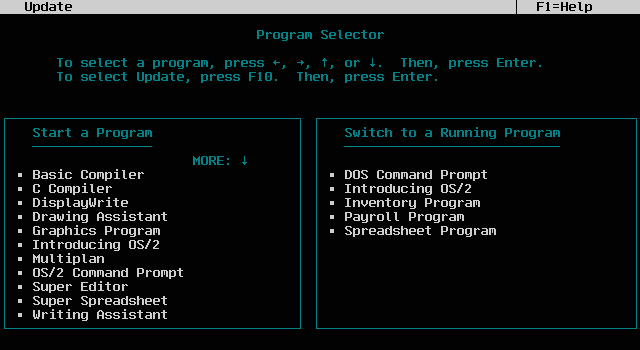
The theoretical maximum was 16 sessions but because the OS already occupied a few of them, the real limit was 12 user sessions. But that's still 11 sessions more than plain DOS - and probably not much of a limiting factor anyway because there are only so many tasks humans can do at the same time. The original plan was to run Presentation Manager as a single session (or Screen group) under the Program Selector but in actual implementation the functionality of PM and the task switching shell was merged, resulting in PMSHELL. Not the best decision if you ask me... but IBM and Microsoft of course didn't ask me. Back in the late 1980's I couldn't provide a whole lot of valuable input anyway because at that time I wasn't even sure what a PC was and I had certainly never heard of OS/2. I did find computers very interesting however - as long as I could play cool games on them (in my defense I should say that by that time I had already started to dabble in BASIC on 8-bit micros).
The Program Selector was customizable and even had online help (again a screenshot from the tutorial):
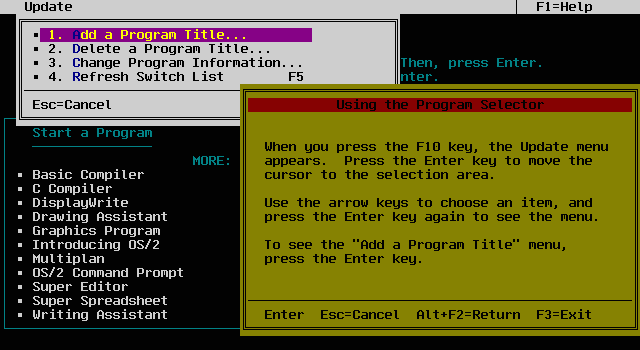
The lightweight text-mode shell TSHELL for OS/2 2.x is obviously modeled after the ancient Program Selector.
The only somewhat sexy (OK, not totally unsexy) program supplied with OS/2 1.0 was the tutorial. It was actually kind of neat. The first screen looked like this:
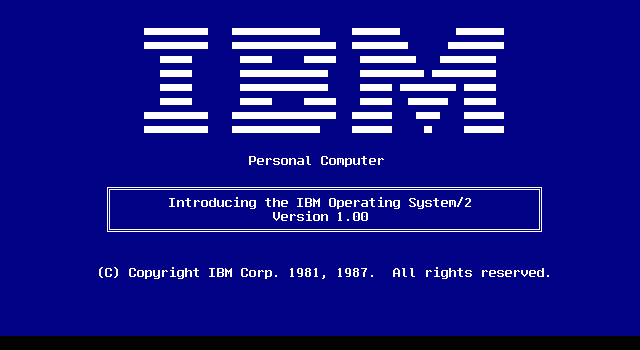
How old is this blue logo screen anyway? The tutorial had two main sections - one presenting multitasking and the Program Selector and the other explaining some basic commands as well as the concepts of directories and files.
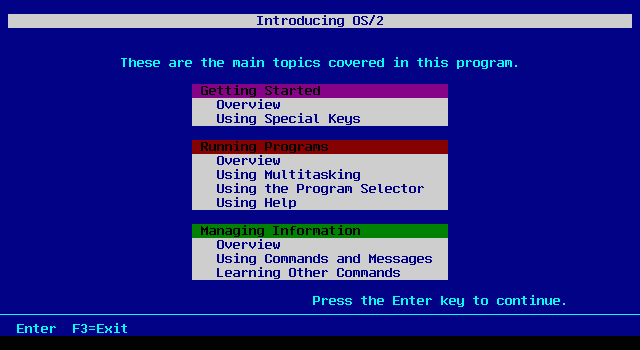
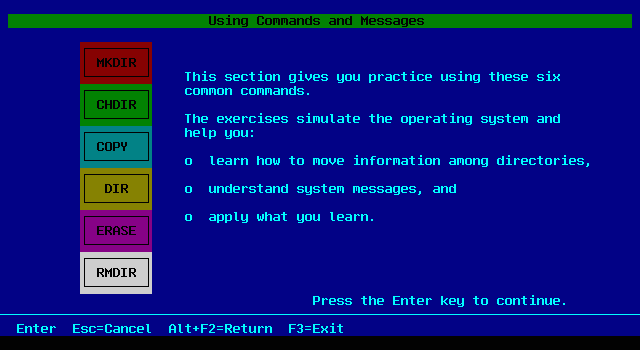
Taking these screenshots was an adventure in itself. Unfortunately I have not been able to install OS/2 1.0 at the time I was writing this. The tutorial program however does run under OS/2 1.3 as well as OS/2 4.5 (yeah, that's some backwards compatibility!). Unfortunately it insists on running in a fullscreen session. But not being the type who gets discouraged easily, I wrote two small programs that capture and display the screen. Thanks to the power of the OS/2 API it actually wasn't all that difficult. I can only shudder when I remember how this would be done under DOS.
Thanks to the generosity of Lewis G Rosenthal, I am now a proud owner of a vintage 286 machine which does run IBM OS/2 1.0. This also at least partially dispels the myth about IBM OS/2 1.x requiring IBM hardware, because this machine includes no IBM components whatsoever and is not even a typical AT class computer. The main system is a Hyundai Super-286C built in 1988, with 10 MHz Intel 80286 CPU, 1 MB onboard RAM and Award BIOS. Somewhat unusual for that era, it also has onboard LPT and COM port as well as a floppy controller. Because 1 MB memory is not enough to run OS/2, the machine has an expansion board installed, a DFI Megalith with 8 MB RAM. Permanent storage is taken care of by a huge (for a 286 anyway) Microscience 160 MB ESDI drive connected to a WD 1007V-SE2 controller. Video is only Hercules monochrome (with a matching Tandy VM-3 green screen of 1985 vintage and with incredibly slow phosphor) but that is quite sufficient for OS/2 1.0 which only runs in text mode anyway.
Installing IBM OS/2 1.0 on this baby was quite easy (once I overcame several initial obstacles that were entirely my fault) and OS/2 runs well on this system. The performance is naturally not exactly blistering - especially the harddrive is no speed demon - but it shows that preemptive multitasking with memory protection was quite feasible on an AT class system. And OS/2 still boots in under 20 seconds on this ancient machine which is more than I could wish for with eCS on my PIII box.
Later on I even got OS/2 1.0 running on my PIII-600(!) after some tinkering. For some reason OS/2 1.0 absolutely refuses to boot from floppy on faster machines. But when I installed OS/2 1.0 on a small 50MB IDE harddrive on the above mentioned 286, OS/2 booted from that disk even in the PIII! I only had to patch one driver (KBD01.SYS) to prevent a Trap 0 - this is the same problem that all 1.x versions of OS/2 have except for the latest releases of OS/2 1.3. Needless to say, OS/2 1.0 runs really fast on the PIII-600.
From a user's point of view, OS/2 1.0 had several deficiencies. Some of them were fixed in later 1.x releases, however some took longer to fix:
- Maximum partition size was 32MB - although this probably was not a major issue in 1987. OS/2 1.1 lifted this limitation (though it was still FAT only) and 1.2 finally came with HPFS support.
- No dual boot or Boot Manager support. Dual boot came with OS/2 1.1, Boot Manager was introduced in 2.0. It is possible that some versions of 1.0 already had Dual Boot but I couldn't verify that. My IBM OS/2 1.0 certainly doesn't.
- No ability to bypass CONFIG.SYS processing. This problem plagued all versions of OS/2 1.x. Together with lack of Boot Manager support it meant that if the user managed to (for example) install a device driver that prevented the OS from booting, he or she just had to resort to the boot floppy (at least there was just one). This was finally fixed in OS/2 Warp.
- No mechanism to replace in-use DLLs. This made replacing system DLLs (such as PM display drivers) rather awkward. OS/2 2.x solved this through an undocumented API.
- It was considered to be too resource hungry (AT with 2MB RAM was recommended though 1MB was the base requirement). I find it interesting that Microsoft later claimed they had never wanted a 286 version of OS/2 anyway - that would either make a 386-only OS a complete dud at that time or its introduction would have to be postponed by several years. Remember that OS/2 2.0 was considered resource hungry even in 1992, five years later. Not to mention Windows NT.
- The DOS compatibility was really not that great and the "penalty box" nickname was not completely undeserved. On the other hand it is a small miracle that OS/2 1.x had any DOS support at all. The obstacles were mountain high. The OS/2 designers also circumvented the problem of DOS compatibility (with a measure of success) by creating the Family API described earlier.
- Outrageous pricing. I'm not sure what the IBM and Microsoft marketers were thinking but I'm certain that for instance charging thousands of dollars for OS/2 development kits didn't help at all (the first release of Microsoft OS/2 SDK in April 1987 cost $3,000!).
- FUD. Again, some things don't change. Perhaps the biggest misconception was that OS/2 required IBM hardware to run. I can only say that it is patently untrue. I have tried running OS/2 1.3 on several different machines - various clones up to 10 years newer than actual OS/2 1.3 - and apart from problems with large harddrives it worked without problems. Even the IBM versions of OS/2 supported non-IBM hardware. It is true that OS/2 did not run on some of the weirder clones but then again, OS/2 probably wasn't the only software that didn't run on those.
Now for a lecture. There's been a lot of disinformation about OS/2 circulated in recent months. Most of this stuff apparently originates with the CEOs of companies who compete with Microsoft in the applications and languages market. Lazy press people who have never run OS/2 and don't know any better pass these falsehoods on to the public.Has anything at all changed since then? Well, yeah - Microsoft drove most of those companies out of business.
On the whole, OS/2 1.0 was neither a smashing success (or we'd be all running OS/2 now) nor a total flop (or I wouldn't be writing this under OS/2 version 4.5). It did introduce a great number of new (mostly good) concepts to the world of PCs. Programming for OS/2 consequently required a great deal of adjustment, especially from DOS programmers who were used to the premise that the hardware was "theirs for the taking". OS/2 suddenly prevented applications from accessing the hardware directly and forced them to behave nicely. However, that was made a lot easier by providing a clean and powerful API. That the API was designed well is proven by the fact that most OS/2 1.x apps can still run years later on the latest versions of OS/2 as well as (to a lesser extent) Windows NT/2000 without any hassles associated with virtualization of DOS or Windows 3.x applications.
Most importantly perhaps, OS/2 1.x built a solid foundation for OS/2 2.0, which itself was a major stepping stone in the PC history. Most of the concepts introduced in OS/2 1.0 proved to be good and were not significantly changed in later releases. Hats off to the original designers and engineers at IBM and Microsoft.
Acknowledgements
Again, the book Inside OS/2 by Gordon Letwin provided me with some valuable insights into the inner world of OS/2.The basis for my screen capture program was one of sample programs from the book Advanced Programmer's Guide to OS/2 by Thuyen Nguyen and Robert Moskal, published by Brady Books in 1989.
I found some interesting tidbits of information in the book Peter Norton's Inside OS/2 by Robert Lafore and (you guessed it) Peter Norton, published by Brady Books 1988.
All this information is accurate to my knowledge. As I have hinted above, I never actively used OS/2 1.x, hence there are bound to be omissions or errors in the text. If you were around in the 1.x days and have some extra information (or some interesting old software), I will welcome any comments at <MichalN@prodigy.net>.
OS/2 1.1 and 1.2: The Early Years
OS/2 version 1.1
OS/2 1.1 was a major release of OS/2 which appeared in late 1988. The only reason why it wasn't called 2.0 was probably that the GUI had been promised for version 1.0, but wasn't finished in time. The GUI was called Presentation Manager (or PM for short) - almost everything in OS/2 1.x was called "Manager" if you haven't noticed - just by the way, the name Windows 1.0 was developed under was Interface Manager but the Microsoft marketers changed it later, despite protests from programmers.Presentation Manager was codenamed Winthorn (you can hear Windows there) and I believe it was developed primarily at the IBM Hursley Labs in UK but with substantial input from Redmond. It was a cross between Microsoft Windows and IBM's mainframe graphical system (GDDM). The programming paradigm strongly resembled Windows - just like Windows it was message based and many of the messages were even identical. But there was a number of significant differences as well:
- Perhaps the first big difference programmers noticed was the different coordinate system. While in Windows the 0,0 coordinate was located in the upper left corner (which is logical if you know how PC graphics hardware works), in PM it was in the lower left corner (which is logical if you know how the coordinate systems in math or physics work).
- In Windows all drawing operations went to the Device Context (DC). PM also used DCs but there was an added level of abstraction called Presentation Space (PS). This allowed for much higher flexibility.
- OS/2 had much more powerful drawing functions in its Graphics Programming Interface (GPI) - that was the mainframe heritage. Some of the GPI concepts (like viewing transforms) were later incorporated into Windows NT, but not Windows 95.
- The OS/2 programming model was much cleaner. There was no need to explicitly export the window procedure, no WinMain, no nonstandard function prologs and epilogs. It didn't feel like a hack.
This could be a conspiracy on Microsoft's part - but I find the explanation given in Barbarians Led by Bill Gates much more credible: Microsoft programmers started writing Windows versions of Word and Excel (remember, Mac versions had existed before that) around 1986-7. At the time they were expected to begin working on OS/2 versions, the Windows versions were nearly done. They simply refused to throw out all they had and rewrite the applications for PM. And when they finally got around to the PM versions, it was already too late. No conspiracy, just a simple lack of organization and clear strategy which happened to work in Microsoft's favor in the end. One proof of the disorganization at Microsoft is that Microsoft's languages division was 100% behind OS/2 - all the "professional" Microsoft compilers (assembler, C, Pascal, FORTRAN, BASIC, COBOL) released between 1988 and 1991 fully supported OS/2 (even if the entry level "Quick" versions were DOS only). Similarly Microsoft's networking efforts were based largely on OS/2 and after abandoning OS/2, Microsoft had no network server software and had to continue selling OS/2 1.3 before Windows NT was ready.
But I digress again (can't help it, sorry) and I'd better get back on topic. On the non-GUI side OS/2 1.1 finally implemented named pipes (a mechanism of interprocess communication) which didn't make it into OS/2 1.0. Also added was support for "large" FAT volumes - OS/2 1.0 only supported 32MB volumes just like versions of DOS before 3.31/4.0. The "BigFAT" support in OS/2 1.1 could handle partitions up to 2GB in size - in theory at least, the practical limit was lower.
The flavor of OS/2 1.1 I played with was an OEM version (Zenith) of Microsoft OS/2. It came on five 3.5" HD floppies. Before I present the screenshots I'll briefly describe the test hardware. This time it was a Celeron 300A with 64MB RAM, ATI Rage 128 AGP card and a 4GB IDE harddrive. Installation was not as smooth as with OS/2 1.3 because one of the base drivers (KBD$) was trapping. Fortunately the trap screen (also known as the Black Screen of Death) provided me with enough information to patch the device driver and fix the crashes. The trap was apparently occurring due to a "too fast" CPU, as I didn't have this problem on another machine equipped with an appropriately antiquated 386DX/20 CPU. For some reason OS/2 1.1 did not work with a Matrox G400 card (the monitor was getting out of sync) but worked fine with the ATI Rage 128 AGP. Unlike OS/2 1.0 which didn't seem to like more than 4MB memory, 1.1 didn't seem to have any problem addressing the maximum it allowed for (16MB).
The GUI in OS/2 1.1 would certainly not win any beauty contest - one reason was perhaps that it was designed with old graphics cards like CGA in mind. The look and feel strongly resembled Windows 2.x, although not as much as in the beta versions of OS/2 1.1. After bootup the users were greeted with this screen:
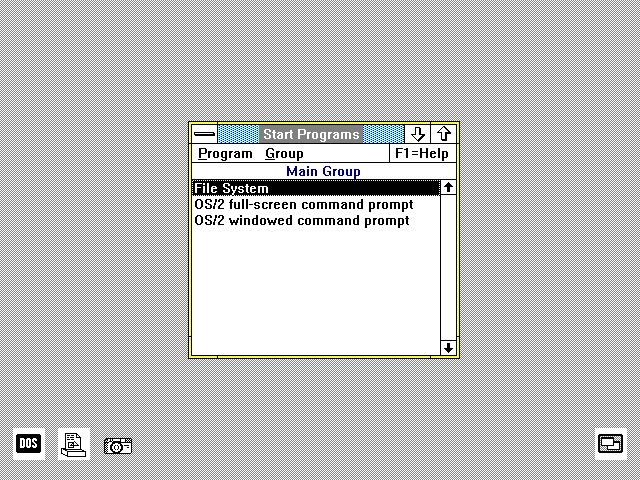
You can see the DOS session icon in the lower left corner, next to the Print Manager icon. Note that OS/2 1.1 only supported monochrome icons (1.2 fixed that). The icon in the lower right hand corner is the minimized Task Manager.
The third icon on the left is my own creation:
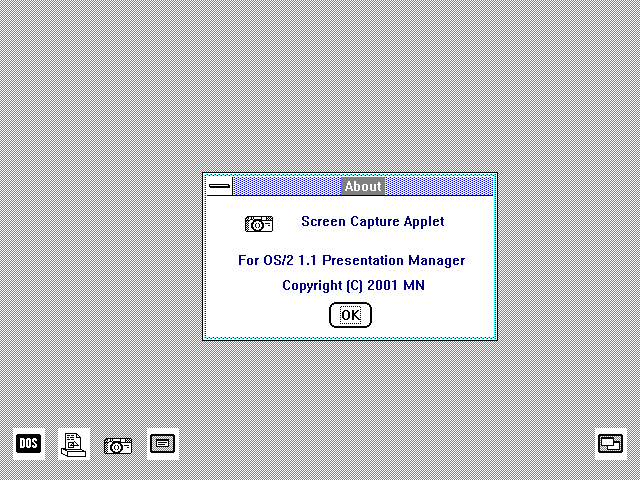
The PM Camera program I used to get OS/2 1.3 screenshots unfortunately crashed under OS/2 1.1 (and 1.2 as well actually). A brief search for an 1.1-compatible alternative came up with nothing (no big surprise there), so I decided to spend a little while and write some quick and dirty utility on my own. I used a sample program from Charles Petzold's book Programming The OS/2 Presentation Manager as a basis (this book was written for OS/2 1.1, actually before 1.1 was released) and then considerably extended it (primarily to allow hot key activation and saving of the captured bitmaps). I must say that next to the Print Manager icon, which appears to be drawn by a 5-year-old, my "screen captor" icon (I called the program PM Pentax after my real-world camera) looks positively slick - or at least drawn by a 10-year-old. I strongly suspect that my screen capture applet will be the last program ever written for OS/2 1.1.
The really neat thing about the PM Pentax program though is that it works well on anything from OS/2 1.1 (model 1988) up to OS/2 4.5 (model 2000). It has no problem capturing 16-color 640x480 desktop and flawlessly handles a 1280x1024 high color desktop as well. I find that pretty amazing. It sounds almost as if someone put some forethought into designing the Presentation Manager.
For comparison, here is what Windows 2.1 looked like:
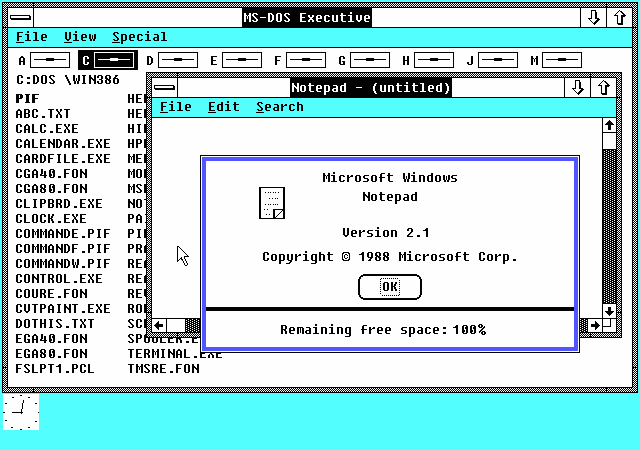
Although it is hard to believe, Windows 2.1 used even uglier color scheme than OS/2 1.1. I find the background color really ghastly. But you can see that all the GUI controls were very similar or identical to the ones used in Presentation Manager. No wonder given that both GUIs were worked on by Microsoft.
Anyway on to more screenshots. Similarly to the later versions, OS/2 1.1 provided a File Manager program:
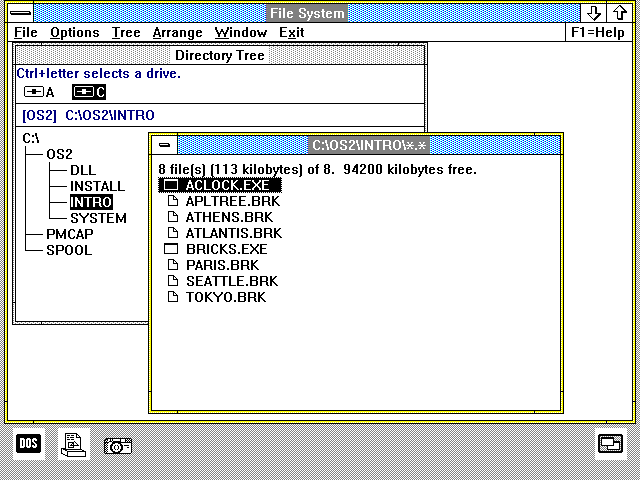
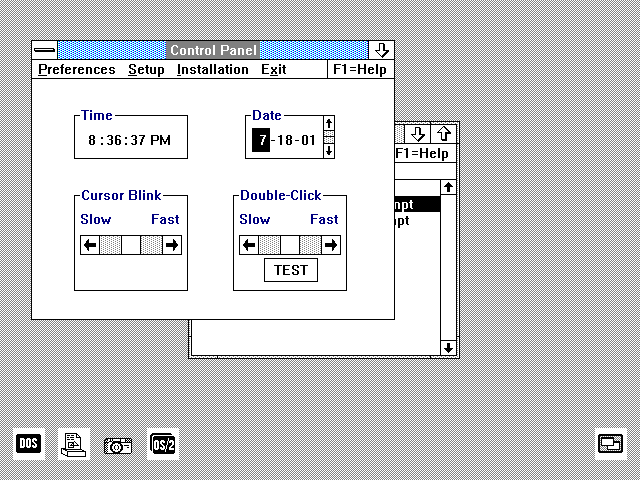
As you can see, it was not appreciably different from the File Manager supplied with the later versions of OS/2 1.x. Similarly the Control Panel was almost identical to the 1.2 and 1.3 versions, only it used the uglier GUI controls:
OS/2 1.1 was even equipped with some online help (invoked by hitting F1 no less!), but the help viewer was not the same as the Information Presentation Facility introduced later in OS/2 1.2 and not nearly as helpful (no search capability for instance):
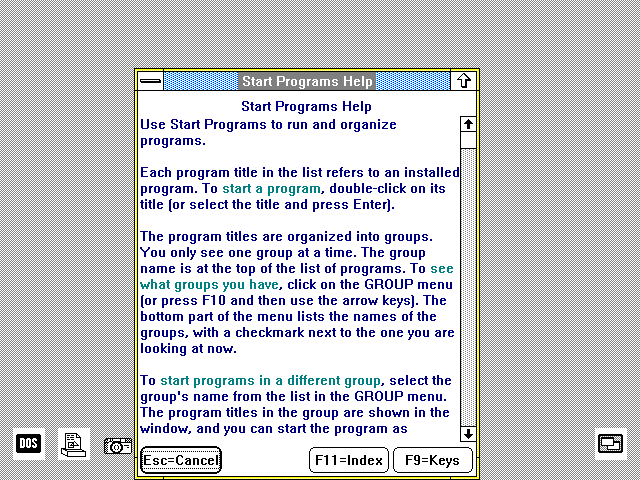
There were no online books supplied with OS/2 1.1. That had to wait for 1.2.
As is obvious by now, OS/2 1.1 was pretty boring. There were two "demonstration" programs included - perhaps with the intent to make it a little less boring. One of them was a simple alarm clock:
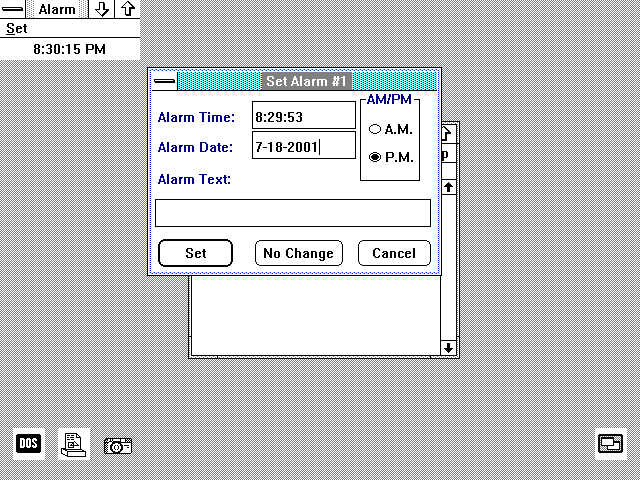
As you can see, it was not terribly fancy. It was probably designed to show off some PM capabilities such as the GUI controls and timers. That seems trivial today but certainly wasn't in 1988, when DOS was still the king of the IBM-compatible world.
The only really nice looking program supplied with MS OS/2 1.1 was the other demo program, called Microsoft Bricks:
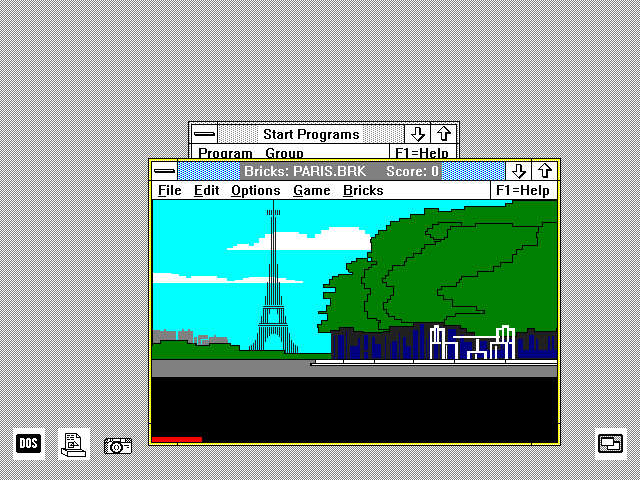
It was a GUI clone of the classic Breakout game. It came with several background "brick walls" to make it more interesting. What unfortunately totally spoiled it for me was the fact that it was way too fast on the 300 MHz machine (it was written at a time when a 20 MHz machine was very high end). Or maybe I'm just getting old and my reflexes aren't what they used to be, it's hard to tell.
Strangely enough, OS/2 1.1 did not come with a GUI editor, not even a simple Notepad-like one. It did come with an editor however - it was called E.EXE but only ran in fullscreen text mode and slightly resembled TEDIT:
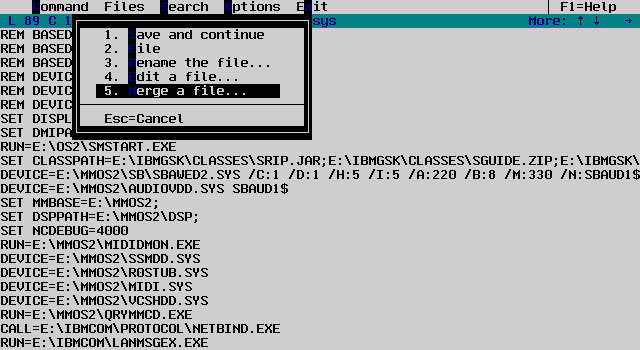
At any rate OS/2 1.1 was a very interesting piece of software technically, if not visually. I believe it was much more advanced than any other operating system available for personal computers at that time. Both Windows and MacOS were certainly no match for it technically - neither had features like preemptive multitasking, multithreading or virtual memory.
But in the end, it's not the technical merits that matter. OS/2 1.1 certainly had drawbacks too. It supported the major graphics hardware standards (CGA, EGA, VGA) but beyond that the support was rather thin. Printer support was pretty pathetic - OS/2 1.1 only supported a few IBM printers and plotters and that was it. No HP, no Epson, nothing like that. For some strange reason, certain things haven't changed much since then...
Also the resource requirements of OS/2 1.1 were considered fairly heavy for the time. The recommended amount of RAM was 3MB - that was certainly a lot when most PCs had one or two MB. Plus it gobbled up about 8 megabytes of disk space - again, a lot at a time when 40MB harddisks were considered large.
But just like with the other versions, OS/2 1.1 found some happy users. Few of them have been running OS/2 ever since (not me, I met OS/2 much later, only after suffering Windows for a while).
Applications
Major business applications written for OS/2 1.1 were very scarce. I have been lucky enough to obtain an original (still shrinkwrapped) box of Microsoft Excel for OS/2 - that was Excel version 2.2 - released in 1989. The box was quite heavy - it was from the forgotten days when software publishers actually shipped their products with printed manuals. Excel came with a fat ring binder manual containing among other things a 700 page reference. The software itself came on both 5.25" and 3.5" floppies. Because of the lack of drivers mentioned above, Excel actually came with printer drivers for Epson and PostScript drivers.Installing MS Excel 2.2 on OS/2 1.1 was not difficult at all and I soon had it working. It is perhaps useful to note that unlike other major spreadsheets like Lotus 1-2-3 or QuattroPro - or even other Microsoft products such as Word - Excel was a GUI program since the beginning and never had a text mode version. It looked like this:
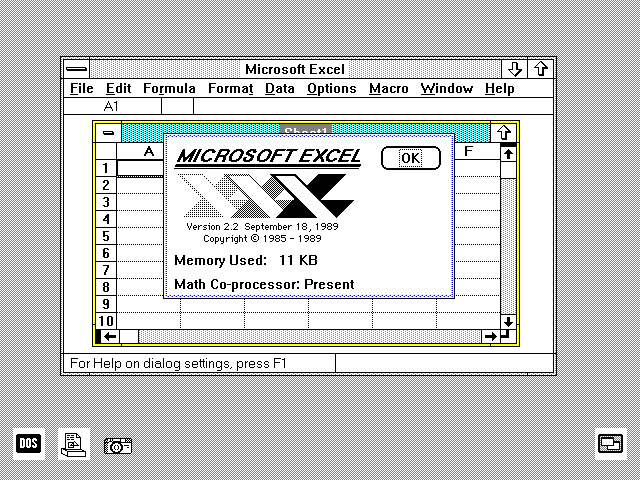
On the whole, it wasn't all that different from later versions of Excel:
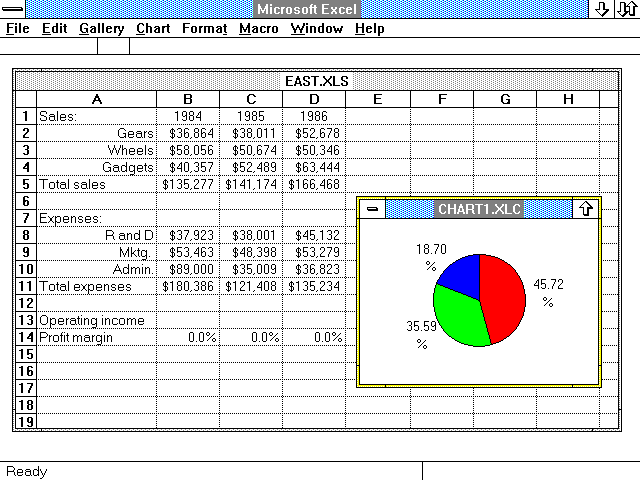
It could do tables, it could do charts, it could do databases, it could do reports. For its age it was actually quite powerful:
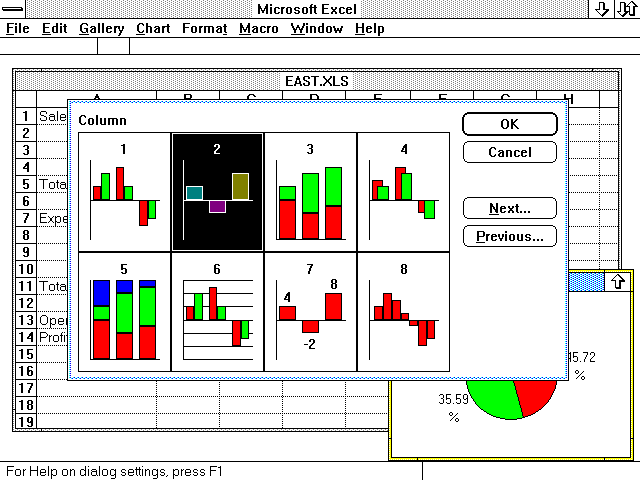
This version of Microsoft Excel for OS/2 was one of the most advanced OS/2 applications from the 1.1 era. And with that I'll leave OS/2 1.1 behind and take a look at OS/2 1.2 which brought considerable enhancements to the OS/2 family.
Intermission
But before I get to OS/2 1.2, here are two interesting bits of information (or at least interesting rumors) I gleaned from books about Microsoft, namely The Microsoft File and Barbarians Led by Bill Gates (in that order) concerning the OS/2 1.1 and 1.2 era.The first interesting fact/rumor is that in late 1989, after learning Microsoft's plans for Windows and (non-plans) for OS/2, Jim Cannavino (head of the Personal Systems division at IBM) proposed to kill OS/2 and buy a 40% stake in Microsoft, after determining that the future of OS/2 looked bleak. IBM's CEO John Akers (lucky for us) refused, and one good reason was that IBM had serious doubt the FTC (Federal Trade Commission) would approve of that. So instead, IBM decided to "fix" OS/2 and compete head on with Microsoft. In fact FTC tried to accuse IBM and Microsoft of collusion after they announced in 1989 that IBM's OS/2 would cover the high end market and Microsoft Windows the low end. This accusation was soon revealed as completely unsubstantiated after the Microsoft - IBM "divorce" in 1990 (and then the FTC concentrated its attention solely on Microsoft).
The other somewhat shocking piece of information is that in 1987-1988 Microsoft really was seriously behind OS/2 and wanted to kill Windows. Windows 2.0 would be finished as a platform for delivering Excel but no new versions would be developed. But then some enterprising Microsoft programmers "secretly" converted Windows to run in protected mode as their own pet project and after showing the results to Steve Ballmer and Bill Gates, it was decided to continue the development of Windows. When Windows 3.0 turned out to be a hit in 1990, Microsoft decided that they didn't want to split their profits with anyone else after all and dumped IBM.
I am not trying to claim that any of the above is true. I personally think it doesn't sound too unlikely but I'm not going to try to convince anyone.
OS/2 version 1.2
In late 1989, IBM and Microsoft released OS/2 version 1.2. This was a very important event in the history of OS/2 because version 1.2 finally implemented all (okay, most) features promised for OS/2 before it even appeared. Since 1.0, programmers were forewarned not to rely on the 8.3 naming convention present in the FAT filesystem and not to parse file names themselves. In OS/2 1.2, IBM and Microsoft finally realized the threats and added support for Installable File Systems (IFSs) and supplied the first incarnation thereof, the High Performance File System (or HPFS for short).HPFS was designed from the ground up by Gordon Letwin, Chief Architect of OS/2 at Microsoft. This new filesystem overcame pretty much all the annoying limitations of the FAT filesystem. Among the major features of HPFS were:
- No 8.3 file name limit. File names could be up to 255 characters long and the set of acceptable characters was wider than in FAT - it included the space for instance.
- Support for Extended Attributes. Each file or directory could have up to 64K of Extended Attributes associated with it. Any kind of information could be stored there, such as program icons, descriptions, cataloging information etc.
- Support for large disks. While FAT volumes can only be 2GB large, HPFS supports up to 64GB volumes, although this support was severely limited by the disk drivers at the time.
- Resistance to fragmentation. While FAT drives need to be regularly defragmented to prevent sometimes very noticeable loss of performance, HPFS tries to allocate contiguous space for files, keeping fragmentation to minimum.
- Minimal allocation waste. The largest sized 2GB FAT volumes allocate space in 64KB clusters, leading to massive disk space waste (easily 50%), whereas HPFS allocates 512 byte sectors, thus minimizing the losses.
- Very high damage resistance. If the FAT table on a FAT volume gets destroyed, all the rest becomes a pile of useless junk because the allocation information is 100% concentrated in the FAT. HPFS on the other hand duplicates some of the information and keeps the disk structures doubly linked (ie. linked in both directions). This assures that if one area of the disk gets damaged, the data loss will be localized to that area of the disk. Even if a directory sector dies for instance, the files in that directory will be recovered.
It is interesting that FAT was known to be more of a liability than an asset even in the 1980's but Microsoft is still selling it with its Windows 9x line many years later (an eternity in computer time). They have removed some capacity and naming limitations but other problems such as extremely low damage resistance remain completely unaddressed. The problem with FAT is that it was designed for floppies - it was developed by Bill Gates and Marc McDonald in 1977. "When applied to fixed disks, however, the FAT began to look more like a bug than a feature", to quote an article by Ray Duncan (author of several excellent books on DOS and OS/2 programming) published in September, 1989 issue of Microsoft Systems Journal.
But let's get back on topic. OS/2 1.2 also had a new look and feel - which was later used in OS/2 1.3 without noticeable changes. Hence I didn't make quite as many screenshots of OS/2 1.2 and will refer you to the page about OS/2 1.3 instead. It is perhaps useful to note that this look and feel was nearly identical to that of Windows 3.0, released a few months after OS/2 1.2. The Presentation Manager itself underwent some changes internally and the API was slightly changed since OS/2 1.1, but changes between 1.2 and 1.3 were negligible. Hence many applications later required either OS/2 1.2 or 1.3, but often wouldn't run on 1.1.
My test machine was the same as for OS/2 1.1 and I also had the same problem with KBD01.SYS crashing which I fixed in an almost identical manner. Apart from that everything worked well.
The version I installed was actually IBM OS/2 1.2 EE (Extended Edition) but I will not describe the EE components here (but you can see it here). As I mentioned above, OS/2 1.2 looked very much like 1.3 and there were very few differences. You can see for yourself - here's the Desktop Manager:
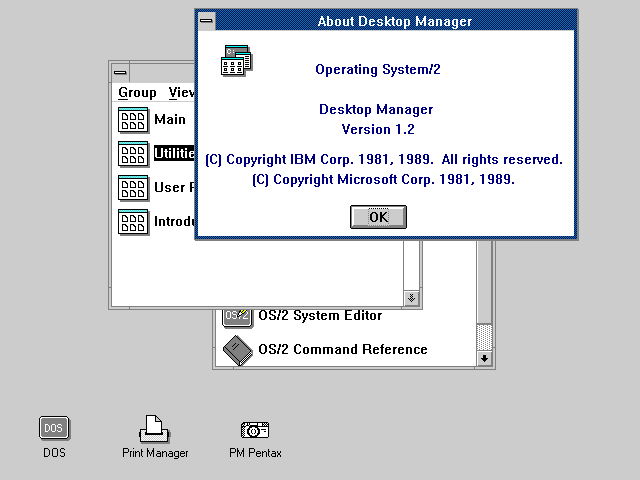
IBM's OS/2 1.2 also came with a set of tutorial programs for the EE components as well as for the base OS. Here's what the tutorials looked like:
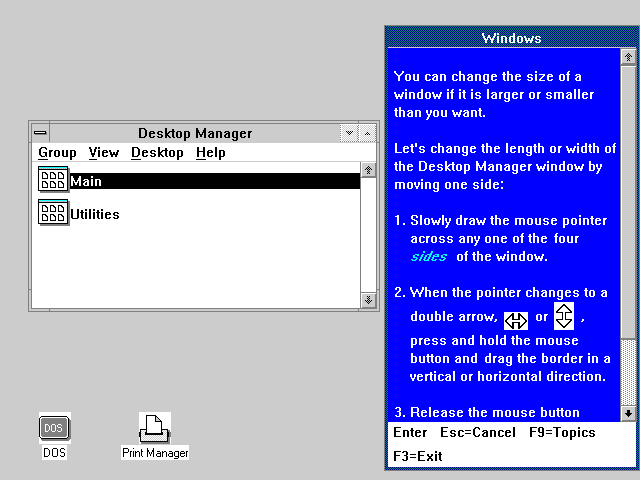
I believe MS OS/2 did not include any tutorial program but I couldn't verify that, not having access to MS OS/2 1.2.
The similarity between OS/2 1.2 and Windows 3.0 was really striking. In case you already forgot what Windows 3.0 looked like, here's a reminder:
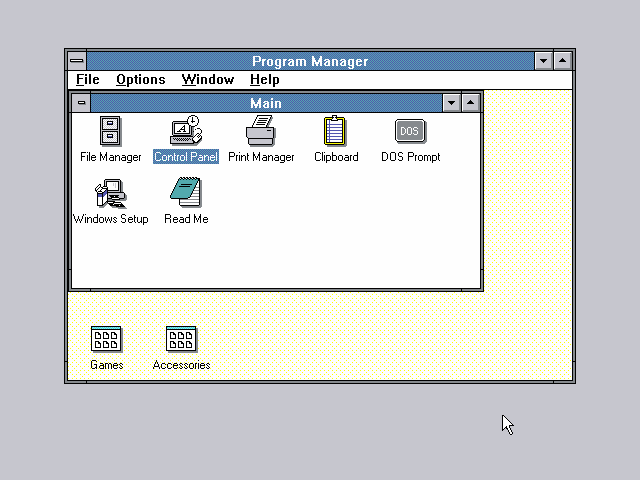
The color scheme was very similar and some of the icons were identical, as well as the fonts. The big difference between OS/2 and Windows was that Windows 3.0 ran on top of DOS and in fact could even run inside the OS/2 1.2 compatibility box (the Windows 3.0 README describes this). The other difference was that Windows came with a vast array of drivers compared to OS/2 as well as a wide range of applets (mostly useless, except for Solitaire of course). OS/2 was much more businesslike and felt somewhat bare in comparison. Which may well be one of the reasons why Windows gained much wider acceptance among end users.
Acknowledgements
My description of HPFS is partially based on article by Ray Duncan that appeared in September, 1989 issue of Microsoft Systems Journal.The "seed" for my screen capture program was one of sample programs from the book Programming The OS/2 Presentation Manager by Charles Petzold, published by Microsoft Press in 1989.
My thanks go to the OS/2 old-timers and not-so-old-timers who provided me with stuff to write about. They are John Martin Alfredsson (Sweden), James E. Burke, Jr. (USA), Vitus Jensen (Germany), David W. Noon (USA), Paul Ratcliffe (UK), Nino Solazzo (Italy?) and Illya Vaes (The Netherlands) - if I have forgotten anyone I sincerely apologize. OS/2 has apparently found followers all around the globe. Special thanks go to Marc L Cohen for providing some interesting insider information.
Barbarians Led by Bill Gates was written by Jennifer Edstrom (daughter of Pam Edstrom of Waggener Edstrom, Microsoft's PR firm) and Marlin Eller (an ex-Microsoft programmer, one of the original Windows developers). This book was published by Henry Holt in 1998. Interestingly enough, this book has been accused of being both pro-Microsoft and anti-Microsoft, which in my opinion greatly increases the probability that it is true.
The Microsoft File: The Secret Case Against Bill Gates was written by Wendy Goldman Rohm and published by Random House in 1998 (was 1998 a bad year for Microsoft or what?). This book quite obviously wasn't written to further the glory of Bill Gates and Microsoft and spills many of the dirty little secrets.
All this information is accurate to my knowledge. I never actively used OS/2 1.x, hence there are bound to be omissions or errors in the text. If you were around in the 1.x days and have some extra information (or some interesting old software), I will welcome any comments at <MichalN@prodigy.net>.
OS/2 1.3: Ten Years Ago
I will now present a tour of OS/2 1.3 - that was the version of OS/2 current 10 years ago. To my knowledge, there were three flavors of OS/2 available in 1991:
- Microsoft OS/2 1.3
- IBM OS/2 1.3 SE (Standard Edition)
- IBM OS/2 1.3 EE (Extended Edition)
I have concentrated on the basic version of OS/2, namely MS OS/2 1.31. Microsoft positioned it as a server OS (remember, in 1991 Windows NT was still far away and DOS isn't exactly natural server platform) and OEMs often bundled it with MS LAN Manager - which was MS/IBM's (mostly pathetic) response to Novell NetWare. Note that the basic concepts and large parts of the user interface (eg. the NET command) are still present mostly unchanged in today's offerings by both Microsoft and IBM.
Now let's take a look at the package: MS OS/2 1.31 spanned 10 3.5" HD floppies. Those contained the base OS, Presentation Manager, fonts, video and printer drivers (though not a very wide selection). There was no networking support in the base package - one could either obtain the full LAN Manager (including goodies like HPFS386) or just the LAN Manager client (which is probably still available on Microsoft's FTP server!). Let's see what OS/2 1.3 already had:
- Preemptive multitasking
- Multithreading (max. 512 threads system wide)
- Fully protected memory
- No 640K memory limit for OS/2 apps
- Virtual memory (could theoretically use 1GB virtual memory)
- Graphical user interface (Presentation Manager)
- Windowed and fullscreen OS/2 sessions
- Installable filesystems including HPFS
- Support for the REXX scripting language
- Support for only 16MB of physical memory
- Support for 16-bit apps only
- Only a single fullscreen DOS session with not very good compatibility (dubbed "penalty box")
Digression: The DOS support in OS/2 1.x was technically very interesting. The 286 chip was not designed to allow virtualization of real mode DOS programs (unlike the 386). The Intel designers probably had no idea DOS would be so tenacious (the word "pest" comes to mind) and expected fully protected OSes to completely replace it. Hence the 286 supported real mode and protected mode but no easy way to switch between them. That is, switching from real to protected mode was simple (just toggling a bit in the MSW - Machine Status Word, a CPU register on 286 and later chips), but there was no way to switch back - well, no easy way. As we know, engineers can be rather clever sometimes and they don't care if something "can't be done". One such engineer is Gordon Letwin (one of the first ten Microsoft Employees, Chief Architect of OS/2 on the Microsoft side and designer of HPFS among other achievements) who found a workaround for the problem. That is implemented through forcing a hardware reset on the CPU (either by using circuitry external to the CPU or making it reset itself by triple faulting) - after a reset all Intel x86 CPUs start executing in real mode. This method was described as "turning the car on an off at 60 MPH to shift gears" and was used more or less successfully by OS/2 1.x, Windows/286 and Windows 3.x standard mode. The 386 offers much better real mode support (through Virtual 8086 mode).
Base OS/2
I'm sure the original MS/IBM engineers would be shocked to hear what hardware I ran OS/2 1.3 on: Intel PIII-600 CPU, 256MB RAM, Matrox G400/32MB graphics card. I only had to remove my 40GB harddrive and replace it with a 4GB drive - but that's no surprise because even much newer OSes (like Warp 4 and Windows NT 4, both of 1996 vintage) crash on the 40G drive just like the ancient OS/2 did. Note that this is an IDE drive although OS/2 1.3 supported SCSI hardware of the early 1990's such as Adaptec 154x with attached harddrives and CD-ROMs.I installed OS/2 on a small 512MB HPFS partition (it seems to have a problem with partitions larger than about 1GB - remember that in 1991, typical harddrive was certainly smaller than 100MB. The installation went quite smoothly, although there wasn't that much to install. Supplied display drivers are limited to standard CGA/EGA/VGA/XGA (some vendors had hi-res drivers for their hardware back then) and multimedia support is nonexistent. OS/2 1.3 has no problem using my PS/2 mouse.
OK, now let's finally see some pictures. This is the standard OS/2 1.3 desktop:
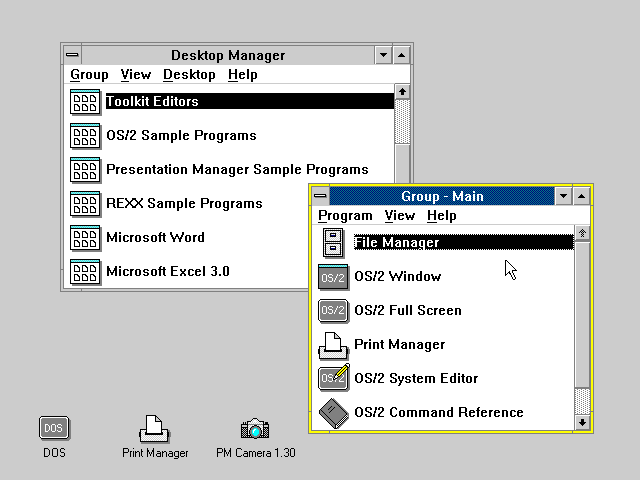
Pretty boring, huh? Note the DOS icon in the bottom left corner. It was always present because the DOS box was always open - although it was not running unless it was in the foreground (ie. fullscreen). Similarly the Print Manager was always running. The interface closely resembled Windows 3.0 both graphically (the GUI widgets) and conceptually - there were no folders to speak of, only program groups containing program icons. The only "big" diffe
목차로 가기